AWS Lambda Cost Optimization: Simple Guide + Terraform Hands-On
Learn how to optimize Lambda costs and deploy your first function with Terraform
Why AWS Lambda?
AWS Lambda lets you run code without managing servers. You pay only for requests and execution time. It's ideal when your traffic is unpredictable or event-driven.
Cost Optimization: the real levers
Lambda cost is not magic. It depends on a few things:
Execution time: shorter runtime = cheaper.
Memory size: more memory costs more, but can reduce runtime.
Invocation count: many small calls can still be expensive.
Cold starts: mostly a latency issue, but can push you to use more memory.
Quick tip: try 256MB, 512MB, 1024MB and compare cost per request. Sometimes more memory is cheaper overall because the function finishes faster.
Advantages of Lambda
✅ No server management
✅ Auto scaling
✅ Pay per use
✅ Easy integration with AWS services
✅ Fast to deploy
When to use Lambda
Lambda is a great fit for:
Webhooks and API endpoints
Event-driven tasks (S3, DynamoDB, SQS, EventBridge)
Scheduled jobs (cron-like)
Small microservices
Irregular or spiky traffic
When NOT to use Lambda
Avoid Lambda if:
❌ The workload is long-running or heavy (video processing, big ETL)
❌ Traffic is constant and predictable (often cheaper on EC2 or containers)
❌ You need a long-lived in-memory state
❌ You need low-level OS or network control
Hands-on with Terraform (simple)
This repo already includes a minimal Lambda + API Gateway using Terraform.
📦 Source Code
Get the complete code here: serverless-stack on GitHub
git clone https://github.com/Ankoay-Feno/serverless-stack.git
cd serverless-stack
Prerequisites
AWS account
AWS CLI configured
Terraform >= 1.5
Python 3.x or Docker (for packaging dependencies)
Step 1: Configure AWS CLI
aws configure
Make sure your AWS profile name matches the Terraform variable aws_profile in terraform/variables.tf.
Step 2: Review variables (optional)
Open terraform/variables.tf and edit if needed:
aws_regionproject_nameaws_profile
Step 3: Initialize Terraform
cd lambda-function/terraform
terraform init
Step 4: Plan and apply
terraform plan
terraform apply
Terraform will:
Build the Lambda package using
terraform/build.shCreate IAM role + CloudWatch logs permissions
Deploy Lambda
Create HTTP API Gateway
Step 5: Test the API
After apply, Terraform outputs the API URL:
api_url = https://xxxxxx.execute-api.us-east-1.amazonaws.com
Open it in your browser.
Step 6: Cost calculator endpoint (Python)
The Lambda API exposes a simple cost estimator at the /cost endpoint.
Example with defaults:
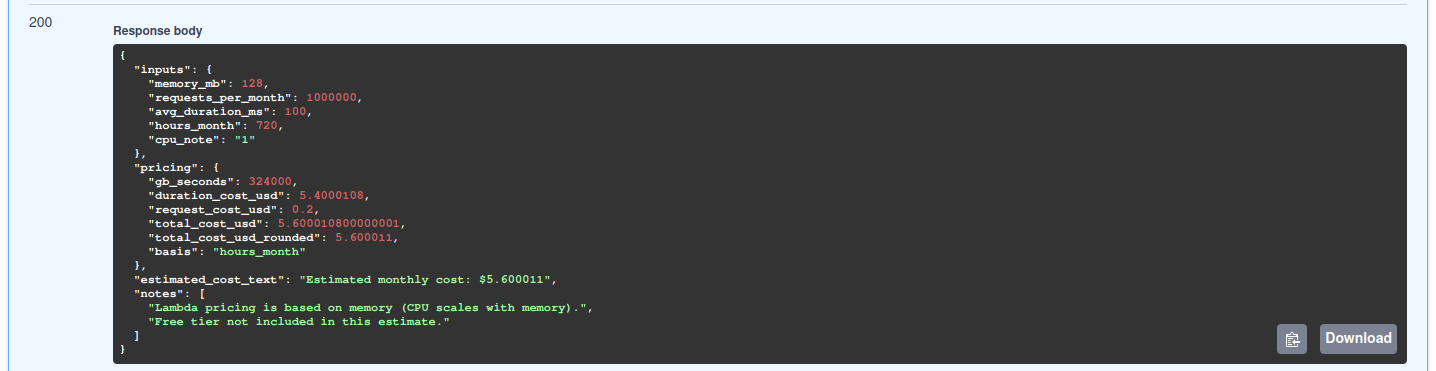
I take the maximum utilization of 1 million requests per month with 512MB memory and 200ms execution time; the estimated cost is around $5.60.
Clean up
To delete everything:
terraform destroy
This will remove all AWS resources created by Terraform.
Conclusion
AWS Lambda is powerful and cost-efficient when used correctly. The key is to match it to the right workload: short, event-driven, and unpredictable traffic. For stable or heavy workloads, EC2 or containers can be cheaper.
🚀 Next Steps
If you want, I can also add:
Cost examples (1M requests, memory sizing)
A monitoring section (CloudWatch metrics + alerts)
A Terraform module layout for production use
Found this helpful? Don't forget to star the GitHub repo and share with your team!
Got questions? Drop them in the comments below 👇